Why catalog a home library at all
Past a few hundred books, memory stops working as a catalog. The signs are familiar:
- You buy a book you already own. Usually in a bookshop, usually the paperback of the hardcover on your shelf at home.
- You lend a book and it's gone. You remember lending it. You don't remember to whom.
- Your "owned" and "read" lists don't match. Half your shelf is unread, and half of what you've read isn't on your shelf.
- You couldn't list it if you had to. For a move, an insurance claim, or just to share with family.
A catalog fixes this when it's quick to build, easy to search in a shop, and tied to your reading life. Otherwise it becomes one more spreadsheet you stop updating.
What to record for each book
- Title, author and ISBN. The ISBN is how you tell editions apart and how a scanner finds the book.
- Whether you own it. Owned, not owned, or not sure yet. That lets one library hold both your shelf and your reading history.
- Format and binding. Print, ebook or audiobook; hardcover, paperback or mass market.
- Where it lives. A shelf per room or bookcase works well ("Office", "Kids' room").
- Who has it. If it's lent out: to whom, since when, and when it's due back.
How to catalog your books in Leafed
1. Add the books
- Scan the barcode. Point your phone at the ISBN barcode on the back cover. Leafed looks it up in Open Library, then Apple Books, Google Books and Leafed's own indie catalog if Open Library has no record, which helps with recent releases. Scanning needs a connection for the lookup.
- Search by title, author or ISBN for books without a barcode.
- Add it by hand for anything no catalog has: older books, small presses, signed editions.
- Import if you already have a list. Goodreads, StoryGraph, Bookmory and Audible imports are built in, and a Goodreads export's Binding and Owned Copies columns (or StoryGraph's Owned column) carry over.
2. Mark what you own
Each book has a Copy row: owned, not owned, or unknown, plus the binding for print books. Filter your library to Owned or Not owned, or by binding, to see just the physical shelf. Format (print, ebook or audiobook) sits on the book too.
3. Shelve it the way your house is
Make custom shelves for rooms or bookcases, with one level of sub-shelves if you need it ("Living room > Left case"). A book can be on more than one shelf, so "Office" and "Want to Read" don't fight. For browsing, switch between list, grid and a shelf view of spines. Sort by title (ignoring "The", "A" and "An"), author, date added, page count, year published, format, random, or even cover color.
4. Track what you lend and borrow
Turn on Lent or borrowed on a book's Book Info card. Choose Lent out or Borrowed, add who has it (or which library it came from), the date it changed hands, an optional due date and a note. Loans show as out, due soon in the last seven days, overdue, and returned. The Lent & Borrowed screen in your library has Lent, Borrowed and Returned tabs, so "who has my copy?" takes one tap.
Using the catalog in a bookshop
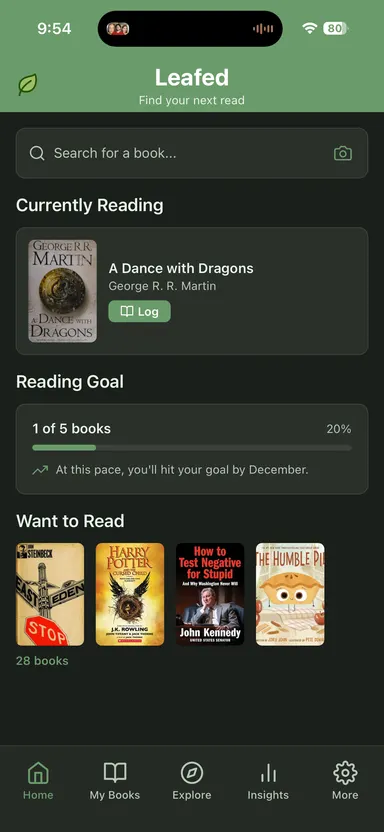
The real test is standing in a shop holding a book. Search your library by title, author or ISBN; search ignores capitals, accents and punctuation. Or scan the barcode: if the book is already in your library, its page shows the shelves it's on. Either way, you'll know whether you already own it.
How the options compare
| Option | Adding books | Lending | Best for |
|---|---|---|---|
| Leafed | Barcode with catalog fallbacks, search, manual entry, imports | Lent and borrowed, due dates, returned history | Readers who want the catalog and the reading log in one private library |
| Dedicated catalog apps (e.g. Libib, CLZ Books, BookBuddy) | Barcode scanning is usually central; check current features | Varies; check current features | Large collections, collectors, small lending libraries |
| Spreadsheet | Typing, or a barcode scanner add-on | A column | Total control and custom fields |
| Goodreads "owned" books | Search or scan into your shelves | Not a lending tracker, as far as we can tell | Readers already there who only need an owned list |
Where Leafed wins (and loses)
Wins: your catalog and your reading log are the same library, so owned, read, unread and lent are filters on one list instead of three apps. Barcode lookups fall back across several catalogs. The lending tracker covers both directions, including library books. It's private by default, no account required, and free. When you need the list out, export a CSV, a Goodreads-format file with binding and owned copies, or a PDF of the whole library, which is handy as a printed inventory.
Loses: Leafed isn't a collector's database. There are no price or value fields, no condition grading, and no dedicated location field beyond shelves. There are no push reminders when a loan is due. And each library belongs to one reader's account, so a household sharing one catalog isn't supported. If you're cataloging a large collection for value, or for a school or club, a dedicated catalog app is a better fit; check its current pricing and features.
Catalog a bookcase in one evening
- Make one shelf per bookcase or room.
- Start with the case you use most. Scan every barcode, then add the rest by search or by hand.
- If you scanned from the main library, select the new books and add them to that bookcase's shelf in one pass. Set Owned and binding on each book as you go.
- Mark anything currently lent out, with the person's name.
- Next time you're in a bookshop, search before you buy.
Related reading
- Book tracking spreadsheet: free template
- How to organize a TBR / Want to Read list
- How to track books you've read
- How to save quotes from books
FAQ
What is the easiest way to catalog a home library?
Scan each book's ISBN barcode with a phone app, add the rest by search or by hand, and mark which books you own. Shelve by room or bookcase so you can find them, and log loans as they happen.
Can I scan book barcodes with my phone?
Yes. Leafed scans the ISBN barcode with your phone camera and looks the book up in Open Library, then Apple Books, Google Books and its own indie catalog when Open Library has no record. The lookup needs a connection.
How do I keep track of books I lend to friends?
Record who has the book, when you lent it and when it's due back. In Leafed, turn on Lent or borrowed on the book, and the Lent and Borrowed screen lists everything that's out, due soon, overdue or returned.
Can Leafed tell me if I already own a book?
Yes. Mark books as owned, then search your library by title, author or ISBN, or scan the barcode, before you buy.
Is Leafed a good fit for a large collection?
It works well for a personal library tied to your reading. It has no price, value or condition fields and no shared household catalog, so collectors and lending libraries may prefer a dedicated catalog app.